Saturday, August 9, 2008

Photo DVD Maker

Photo DVD Maker - Make High Resolution Slideshow For TV
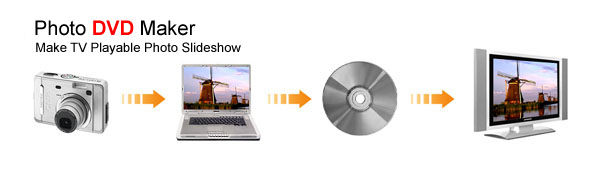
Photo DVD Maker Title Image

Photo DVD Maker helps you create photo album on DVD disc playable on TV, website, mobile devices such as Apple iPod, Sony PSP, cellular phone. With few clicks, Photo DVD Maker creates a professional-looking photo slide show with background music, Pan & Zoom and transition effects.

Photo DVD Maker supports DVD, SVCD and VCD 2.0, MPEG, MPEG-4, FLV (Flash for Video) as the output format, supports over 360 amazing transition effects, Pan & Zoom, anti-flickering filter, supports adding background music directly from music CD and adding text Macro such as photo album name, photo file name, date, etc. It supports sub-title and art clips for each photo slide which adds amazing special effects for the slideshow. It also supports voice recording, annotation, audio music trimming and timeline control for easier audio/photo synchronization.

As Easy as 1-2-3 !

With Photo DVD Maker, you can use digital photos, pictures, music, captions and interactive menus to create high quality slide show in 3 easy steps.

High Resolution for TV!

Photo DVD Maker optimizes your digital photos and use the High Resolution Picture format which is supported by DVD and SVCD. The resolution of the image shown on TV can be as high as 704x576. This technique makes photo look great on TV.

Burn and Share!

Burn slide show to CD and watch them on TV using your home VCD or DVD player. Photo DVD Maker offers an easy, complete way for you to create professional-looking photo DVD CD from your photos, pictures and music. With an easy-to-use design, quickly arrange your own menu layouts, assemble fully customized photo slide shows, and burn your final project as a DVD or VCD disc. Share your memories on the big screen like never before. Three steps - that's all it takes to make your own photo video DVD: Add your photos to slide show, design your own DVD menu, and burn your disc. It's that simple.


Photo DVD Maker strengthens all its original merits such as multiple transition effects, background music, adjustable slide duration and editable text showed on pictures. With this powerful digital photo album software, you can:

--- Create and burn your photo slide show DVD or CD with clicks

With only a few clicks, you can conveniently create your own digital photo album. After the preview of your slide show created, you can easily burn them onto a blank DVD or CD disc that can be enjoyed both on your PC and TV with a DVD or VCD player. Within a few minutes of work, you'll have an eye-catching slide show with DVD, SVCD, VCD 2.0, MPEG, MPEG-4, FLV as output formats.

--- Watch and share your digital photo on TV, PC, mobile device, website, YouTube, MySpace

Photo DVD Maker can quickly and easily produce professional-looking photo slide show DVD disc or MPEG video files and share digital photo albums on home big screen TV, computer, website, iPod, PSP, YouTube, MySpace.

--- Save and organize your Photo, Picture and Image

DVD+R/RW, DVD-R/RW or CD-R or CD-RW is really a perfect place for pictures: hundreds of your photos can be saved on a single DVD or CD disc. With Photo DVD Maker, you can easily archive hundreds of your favorite high-resolution photos into a DVD or CD disc that is accessible by your PC. You can share your archived DVD or CD disc with friends, family, clients or colleagues!

Download Trail(25 MB)

Click Here

Full Version

Visit Website


Xilisoft 3GP Converter


Xilisoft 3GP Video Converter is powerful 3GP converter software for mobile phone users. The 3GP converter can convert AVI to 3GP, MPEG to 3GP, 3GP to AVI, 3GP to MPEG, etc. easily and fast.

Xilisoft 3GP Video Converter supports all mobile phone video formats including 3GP, 3G2 and MPEG-4. It supports converting so comprehensive video formats including AVI, MPEG, WMV, DivX, XviD, MP4, MOV, RM to 3GP, 3G2, MPEG-4. The 3GP Converter could also convert 3GP to popular video file formats such as 3GP to AVI, MPEG, DivX, WMV, etc. Free download Xilisoft 3GP Video Converter to have a try!

Download Link

Click Here

Visit To Buy

Click Here

Advance GIF Animator

Advanced GIF Animator is a powerful tool for creating animated GIF images. Industry experts named it number one software in its class when considering cost, performance, number of options and ease of use. The program works under Win 95/98/Me/NT/2000/XP/2003/Vista operating systems.

Versatility. Advanced GIF Animator can be used both by amateur designers and professionals. No special training or knowledge is required! This software can by used as a stand alone application or to supplement Windows Paint, PaintShop Pro or Adobe Photoshop. All major image formats like BMP, JPEG, TIFF, AVI, ICO, and Windows Metafiles are supported. Anyone can create studio quality animation with little experience.
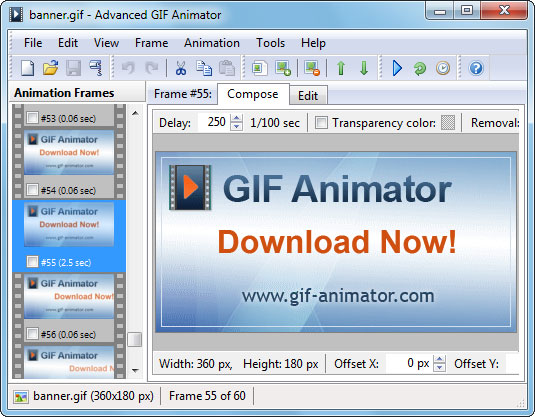

"Banner friendly" software. While you can use Advanced GIF Animator for great number of applications, we specifically designed it to make creating high quality banners fast and straightforward. It means, you are given a powerful set of tools to make banners that attract visitors attention. The software also features automatic tag creation (maps for tag in HTML), GIF-file size optimization, download time estimates, and other tools for simplifying banner making process.

Full set of editing options. Duplication, mergers, cropping, re-sizing, rotation and frame flipping; capability to create animated GIF-files from sets of BMP, JPEG, ICO, and Windows Metafiles; color palette support; .avi and .ani file export and import - that's just a fraction of features available in Advanced GIF Animator.

Low Cost. Better yet, you are given a trial version to use this software for free. That's right, there are no up front fees. You try the software first and buy it after. Why spend hundreds of dollars on unnecessary software, when you have Advanced GIF Animator available for download free of charge. Corporate users receive significant discounts for volume purchases.

Friendly and responsive tech support. We'll walk you through our software and guide you when you encounter any problems. We'll suggest the easiest way of achieving necessary results. All registered users get prompt answers to their questions.

Download Trial

Click Here

Buy Now

Visit Website

Screenshots:


Screen Recorder

Download ZD Soft Screen Recorder

for Windows 2000/XP/2003/Vista
version: 2.6.4.0

ZD Soft Screen Recorder records screen activities to replayable video file. It uses unique screen recording technology to gain the best recording performance. It outputs lossless screen video in extremely small file size. It is very easy to use. You can use ZD Soft Screen Recorder to create:
  • Screen demos.
  • Training videos.
  • Teaching videos.
  • Animated tutorials.
  • Animated presentations.
  • Animated help files.

Click to enlarge!

Download Trail

Click Here

Buy Now

Visit Website

Google Earth


http://www.bowdoin.edu/about/campus/maps/earth/images/google-earth-window.jpg

Info:

Google Earth combines the power of Google Search with satellite imagery, maps, terrain and 3D buildings to put the world’s geographic information at your fingertips.

- Fly to your house. Just type in an address, press Search, and you’ll zoom right in.
- Search for schools, parks, restaurants, and hotels. Get driving directions.
- Tilt and rotate the view to see 3D terrain and buildings, or look up to explore the sky
- Save and share your searches and favorites.

Google Earth Pro For professional and commercial uses.
Google Earth Pro is the ultimate research, presentation, and collaboration tool for location-specific information.

With Google Earth Pro, it’s easy to research locations and present your discoveries. In just a few clicks, you can import site plans, property lists or client sites and share the view with your client or colleague. You can even export high-quality images to documents or the web.

Annotate and visualize
Represent your location-based data using 3D drawing tools, or transfer up to 2,500 locations by address or geospatial coordinates from a spreadsheet. The GIS Data Importing Module lets you incorporate GIS data in file formats such as .shp and .tab. Examples include parcel, demographic, and 3D building data.

Share and analyze
Share your Google Earth views and data representations with your clients as a KML, Google Earth ?s original file format. With your upgraded Pro subscription, you get additional measurement tools (square feet, mile, acreage, radius and so on), so simply select the points on the screen using your mouse and let Google Earth calculate the rest.

Create visually powerful presentations
Export high-resolution images up to 11″ x 17″ (4800 pixels, sample print - 890k), and use them in documents, presentations, web or printed materials. You audience can come along for the ride as you create your own compressed movies (.wmv, sample movie - 13MB) of the zooms and virtual tours you take in Google Earth.

Useful for many industries
Whether you’re in commercial real estate, insurance or media, Google Earth Pro lets you represent geo-specific information to full dramatic effect. Learn how it’s applicable to your industry

Visit Website

Click Here